

Stop Bleeding Profits: Change eBay Currency Before It Costs You Another Sale
- 2026-05-31
-
 0
0

It happens quietly. You source a product, calculate your margin, and celebrate a win until you notice a strange code on your dashboard: SEK. If you’ve ever asked yourself what is SEK on eBay?, it’s the Swedish Krona, the official currency of Sweden. Seeing it means your eBay currency display has shifted and that shift is costing you a hidden 3% conversion fee on every transaction. That’s why maximizing profits on eBay demands you change eBay currency the moment it doesn't match your operating market. A wrong setting isn't a minor inconvenience; it's a silent profit drain that makes your numbers lie to you every single day.
The Hidden Leak You Never See
When your eBay view displays a foreign denomination like the Swedish Krona, you aren't just seeing a different price. You’re looking at a surcharge baked into the conversion spread, payment processor fees, and the platform’s own rate markup. According to eBay's fee structure and typical payment processor spreads, this silent surcharge typically ranges from 3% to 5%. This impacts everything: your sourcing decisions, your break-even calculations, and your final take-home profit.
|
Factor |
Impact of wrong currency |
What you must do |
|
Conversion fees |
Typically 3% - 5% loss per transaction |
Align your dashboard to your home currency |
|
Price Perception |
Messy decimals (e.g., $19.43) reduce buyer trust |
Round to clean psychological price points |
|
Market Intelligence |
Competitor data appears distorted |
Compare all listings in a single currency |
How to Change eBay Currency Permanently
The solution depends on whether you’re buying or selling, but both paths are fast.
For Buyers:
-
Run a search on eBay.
-
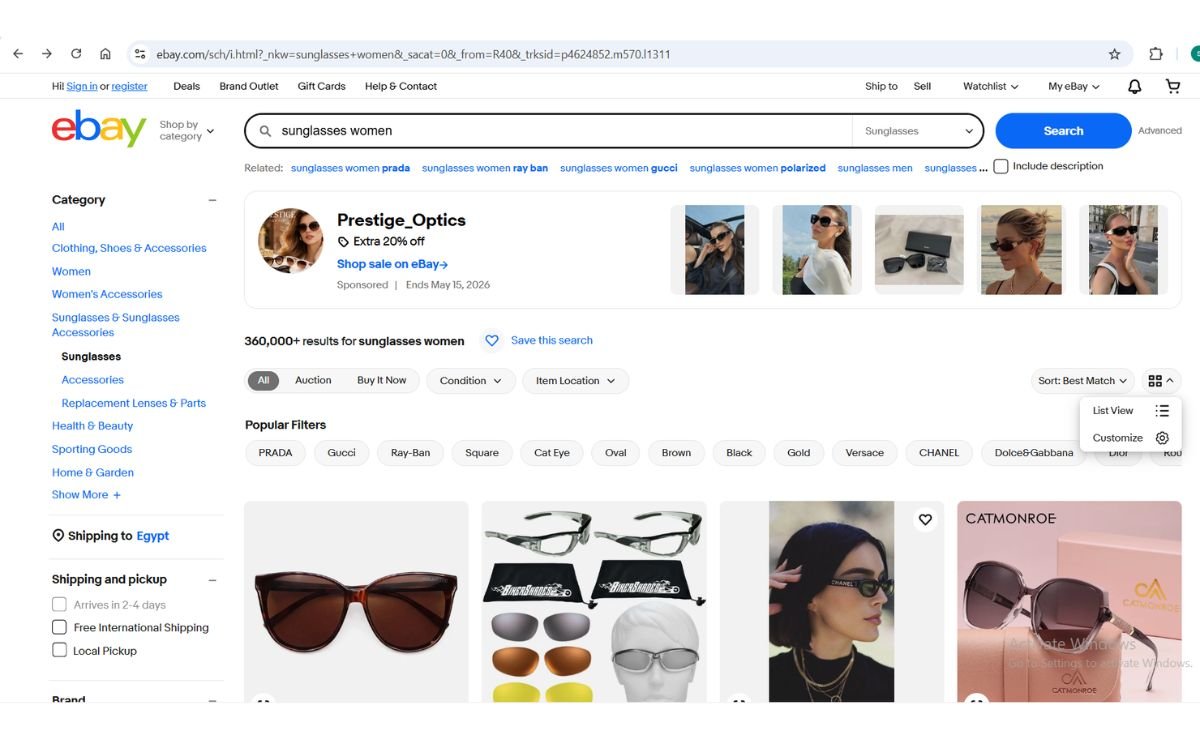
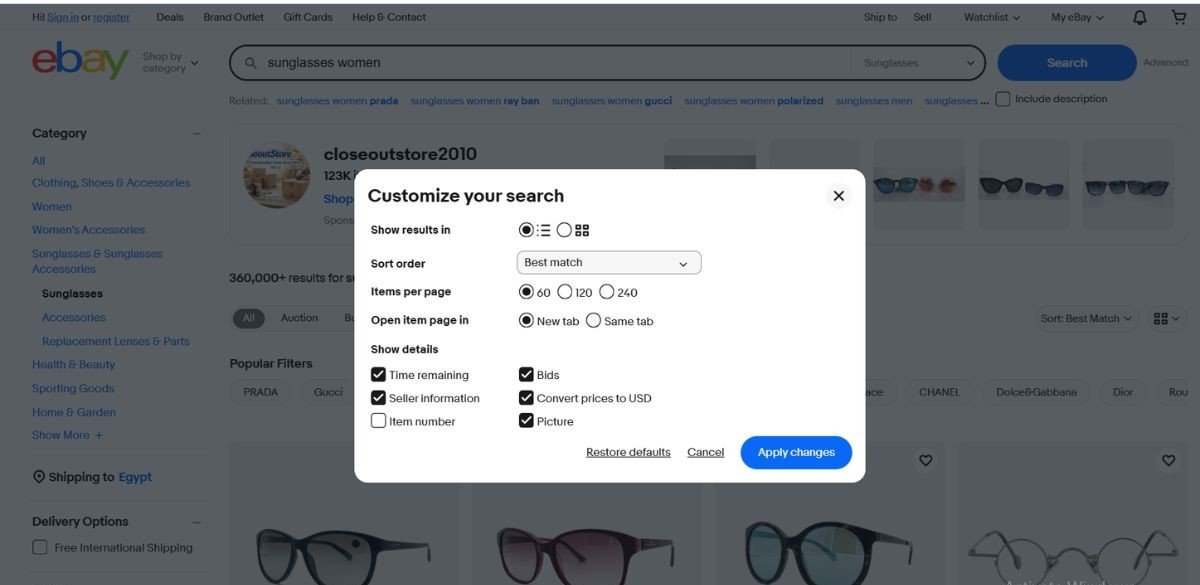
Click the “Customize” menu (grid/list icon) on the top right.
-
Check “Convert prices to [Your Currency]” and apply.
For Sellers:
The listing currency is locked to the site domain you use.
ebay.com = USD, ebay.co.uk = GBP, ebay.ie = EUR.
Simply list the correct domain.
Which Step Solves Almost Everything?
eBay decides your currency based on your Primary Shipping Address. Go to Account Settings > Addresses, ensure your shipping address matches your home country, then clear your cache or relog. Your dashboard will realign instantly. This is the precise method to change currency eBay users need to regain control over how prices are displayed.
What’s the Critical Difference Between Display and Payout Currency?
Everything we’ve just adjusted controls what you see on screen. But there is a more critical setting: your Payout Currency, the currency in which eBay deposits your earnings into your bank.
Under eBay Managed Payments, the payout currency is set when you first register as a seller and link a bank account. The rules differ significantly by country, and the setting can be permanently locked or partially flexible depending on your region.
Specific Rules by Region:
-
United States (ebay.com): Payout currency is locked to USD only. You cannot change it to any other currency. You must have a US-based bank account that accepts USD.
-
United Kingdom (ebay.co.uk): Payout is in GBP only, and your linked bank must be a UK account that accepts GBP.
-
European Union (ebay.de, ebay.fr, ebay.ie, etc.): You can often select between EUR and a local currency (e.g., SEK in Sweden) at registration, but once your first successful payout is sent, the currency choice is typically final. Some sellers report that a one‑time change might be possible via eBay support before any payouts are processed, but this is not guaranteed.
-
Other Markets (Australia, Canada, etc.): Usually locked to the local currency (AUD, CAD, etc.) and tied to a domestic bank.
Why This Matters?
If your payout currency differs from your bank’s currency, every deposit gets hit with a conversion fee exactly the 3%–5% drain we described earlier but this time applied to your entire revenue, not just a single transaction. And because you cannot easily switch currencies later, correcting it may require contacting eBay support, closing your account, or even opening a brand new seller account in the correct country.
Action Step: Before listing anything, verify your payout currency in Account Settings > Payments > Payout Settings. Make sure it matches the currency your bank account actually holds. If you’ve just registered and haven’t received a payout yet, contact eBay immediately to request a change; it might still be possible.
Once you correct your eBay currency view and lock in a clean dashboard, accurate ebay product research becomes possible: you can filter by price, marketplace, and seller feedback, and trust the metrics that matter listing volume, average price, and total units sold without hidden conversion errors distorting your decisions.
When the Wrong Currency Won’t Let Go: Forced Reset
If you still see SEK after updating settings, you’re dealing with cookie persistence or a VPN conflict. Clear your browser cache or open an Incognito window. Also, manually type ebay.com into the URL bar don't rely on old links that may anchor you to a different domain.
A foreign currency like the Swedish Krona isn't just a glitch; it's a signal of a high-income Nordic market. But if your dashboard is truly stuck, you must change eBay currency forcefully to regain control. Only with a clean, stable currency view can you run ebay competitor research that reveals a store’s full product strategy, top-selling listings, pricing patterns, and store-level trends right down to the cent.
Still Stuck? Try These Advanced Fixes:
-
Disable Autofill for eBay: Your browser might be auto-populating an old address from another country, forcing eBay to revert. Go to your browser’s autofill settings and remove any outdated international addresses.
-
Perform a Network Reset: In very rare cases, your IP address’s geolocation data is the culprit. Most home connections use a dynamic IP, restarting your router forces your ISP to assign a fresh IP that correctly reflects your actual country, resolving the currency error. Learn more about dynamic IPs here.
Currency Quick-Reference
|
Symbol |
Currency |
Region |
Seller Insight |
|
SEK |
Swedish Krona |
Sweden |
High-purchasing-power buyers |
|
GBP |
British Pound |
UK |
Major cross-border hub |
|
EUR |
Euro |
EU |
Multi-nation market access |
From a Clean Dashboard to Real Profit
Your currency settings are no longer a mystery. Your dashboard now shows the truth, your competitor data is finally comparable, and your product research sits on solid ground. The next step is turning that clarity into consistent revenue.
Start your $1 trial today and get 14 full days of TS Scout’s marketplace intelligence. Uncover viral niches, decode competitor margins, and build a data-driven brand without risking a single extra cent on distorted numbers.
Frequently Asked Questions
-
Is the converted price I see 100% accurate?
No. The in-page tool shows a mid-market estimate. Always add a 3% buffer for real processing fees. -
Can I change the currency of a live listing?
No. End the listing and recreate it on the correct regional domain. -
Can I change my payout currency after I start selling?
No. This is a one-time choice when you register as a seller. If you selected the wrong payout currency, your only option is to contact eBay support immediately or, in some cases, open a new seller account with the correct currency setting. -
Why does my site keep reverting to SEK?
Your browser cookies or shipping address are overriding your selection. Clear cache, update the address, and try the advanced fixes listed above.
like?