
How to Grow eBay Store Without Inventory: Stop Guessing and Start Scaling
- 2026-08-11
-
 0
0

Are your listed items collecting digital dust while competitor stores across the UK and US generate thousands of sales every single week without holding a single physical item in stock? Scaling a retail arbitrage or supplier-direct ecommerce model on eBay often feels like a blind gamble when relying solely on basic dashboards. According to official announcements on eBay Community, recent updates to eBay's ad algorithms have fundamentally changed how search placement is awarded, making data-backed strategies mandatory for survival.
However, top-tier online merchants do not rely on guesswork; they use data to systematically capture market share. By leveraging the full capabilities of the ebay seller hub tools alongside specialized analytics software, you can turn raw traffic metrics into repeatable revenue streams. This comprehensive ebay seller hub guide breaks down actionable tactics, data-driven optimization routines, and proven tactics on how to scale ebay business without inventory so you can master growing ebay store metrics seamlessly.
How Can You Master the eBay Seller Hub Command Center?
The eBay Seller Hub serves as your centralized operational control board. For merchants who operate without physical warehouses, managing inventory status, tracking uploads, and account health in real-time is vital to prevent order cancellations or dispatch delays..
To maintain an efficient workflow, focus on customizing your daily workspace around three core operational areas:
-
Overview Tab: Monitor your daily "Action Items" widget. Instantly flag unread buyer messages, cases pending resolution, and stock updates from your external fulfillment partners.
-
Orders Tab: Ensure valid tracking numbers are uploaded within your specified handling window. A delay in tracking updates directly damages your seller level metrics.
-
Performance Tab: Track your service thresholds directly aligned with official eBay Seller Levels & Performance Standards, maintaining a Transaction Defect Rate of $\le 0.5\%$ and a Late Shipment Rate of $\le 3\%$ to ensure your account remains in Top Rated status and avoids visibility penalties.
For non-stock merchants, account safety is paramount. Failing to monitor performance metrics can quickly lead to account restrictions or severe visibility penalties. For more details on protecting your store, review our guide on ebay account suspension.
Which Native Tools Help Identify High-Demand Products?
To expand your catalog without taking on inventory risk, you need to know exactly what items buyers in the US and UK are actively purchasing. eBay provides internal research capabilities directly inside the Seller Hub via the Research tab.
|
Feature / Capability |
eBay Terapeak |
TS Scout Analytics (Winner) |
|
Historical Data |
1 Year On-Platform |
Multi-Channel & Multi-Year Trends |
|
Keyword Search Volume |
Estimated |
Exact, Real-Time Volume Data |
|
Competitor Insight |
Basic Store Stats |
Store Strategy & Catalog Mapping |
|
Niche Demand Discovery |
Manual Filters |
Automated Segment Discovery |
Using Terapeak Product Research within the Hub allows you to inspect average sell-prices, sell-through rates, and total units sold over a given timeframe. However, relying solely on native platform data often means analyzing the same trends as thousands of other sellers.
To gain a clearer competitive edge, pair native data with TS Scout’s eBay Segment Insight. This tool helps you discover profitable niches by analyzing specific product categories and market segments, providing segment-level data to evaluate demand, competition, and growth potential before you publish a single listing.
Once you identify potential product segments, cross-reference them using TS Scout’s Product Research to pinpoint top-selling products across eBay, focusing your store strictly on items with verified market velocity.
How Do You Optimize Listings to Drive Organic Rankings?
Traffic generation starts with eBay’s Cassini search algorithm. Cassini prioritizes listings that provide structured product details and match buyer search queries accurately.
How Do You Optimize Your Listings for Higher SEO Rankings?
Maximize Title Relevance: Craft titles that utilize the full 80-character limit, prioritizing primary search terms and specific brand and model identifiers, such as "Nike Air Max 90 Men's Running Shoes Size 10”.
Complete Item Specifics: Fill out mandatory and recommended item attributes (such as brand, size, color, and MPN). eBay’s search filters exclude listings that lack key specifics.
Structured Pricing: Ensure your price aligns with market averages while covering your fulfillment expenses.
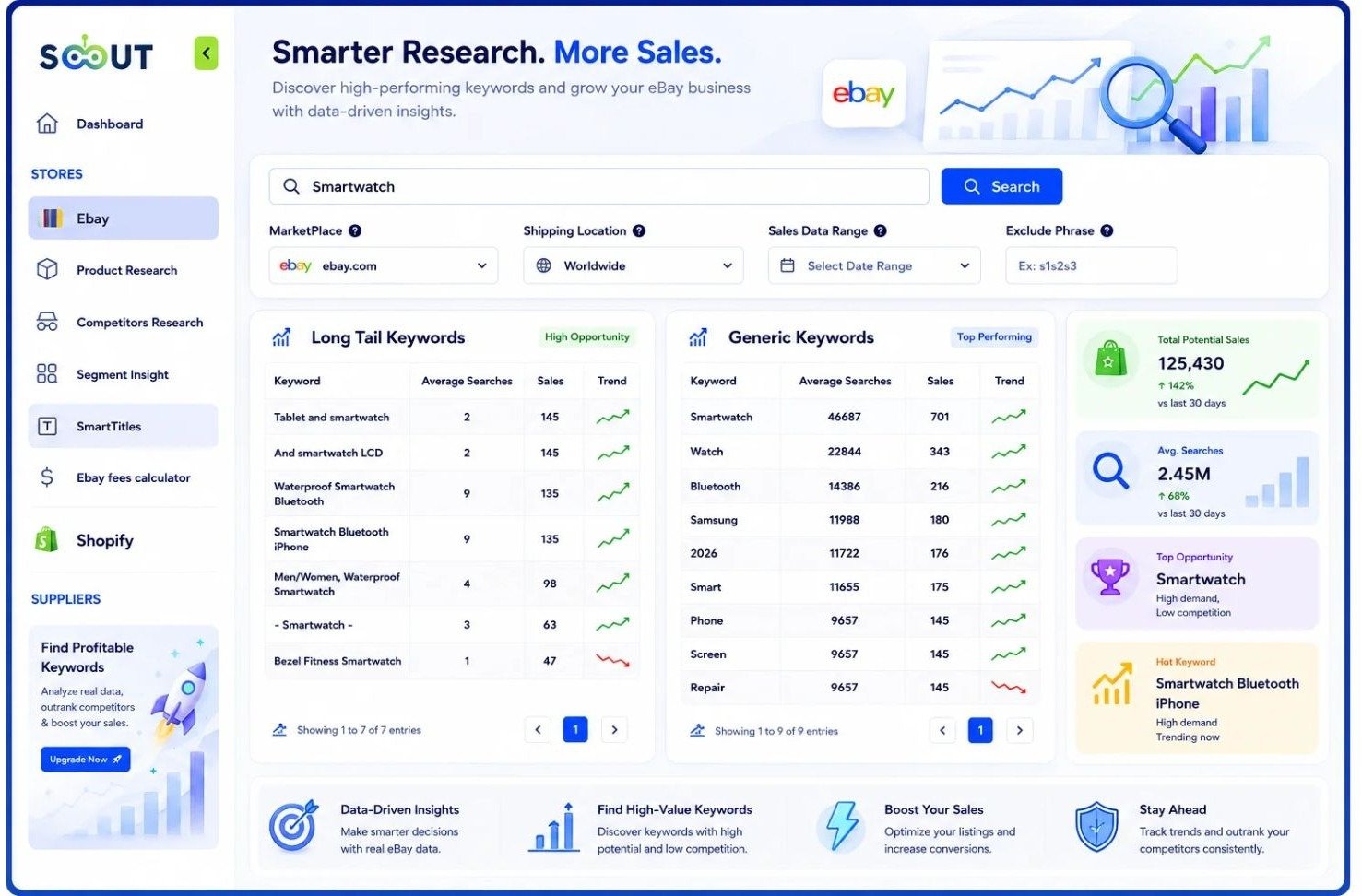
When optimizing titles at scale, relying on guesswork can result in missed impressions. TS Scout’s eBay Smart Titles generates optimized titles using keyword suggestions and real search volume data, directly improving listing visibility, search relevance, and click-through rates.
Before publishing new items, make sure you have chosen the right foundation for your business by checking our detailed guide on how to set up your ebay seller account.
How Can You Leverage Marketing Tools for Maximum ROI?
Organically ranking your products is essential, but leveraging eBay’s suite of internal promotion features accelerates traffic generation.
|
Campaign Type |
Best Use Case |
Cost Model |
|
Promoted Listings General |
Steady catalog visibility |
Cost-per-sale |
|
Priority Campaigns (Top Slot) |
New/High-volume launches |
Cost-per-click |
|
Promotions Manager |
Multi-buy discounts |
Reduced margin per unit |
|
Direct Buyer Offers |
Targeted closing tool |
Reduced margin per sale |
As detailed in official announcements on eBay Community, priority campaigns grant exclusive access to the top ad slot in search results.
What Is the Best Marketing Workflow to Accelerate Store Sales?
Promoted Listings: Apply general campaign rates for steady catalog visibility, reserved for items with sufficient profit margins.
Promotions Manager: Set up Multi-Buy discounts (e.g., "Buy 2, Get 10% Off") to increase Average Order Value (AOV) and offset shipping costs.
Send Offers to Buyers: Regularly access the Listings tab to send direct, discounted offers to prospective buyers who have saved your items.
How Do You Outmaneuver Competitors Without Owning Inventory?
Scaling a non-stock store requires continuous monitoring of competing merchants who source from similar fulfillment channels. According to official UK guidance on Accepting Returns and Giving Refunds: The Law (GOV.UK), sellers catering to British consumers must maintain clear delivery timeframes and transparent return practices, making inventory speed and supplier accuracy critical factors.
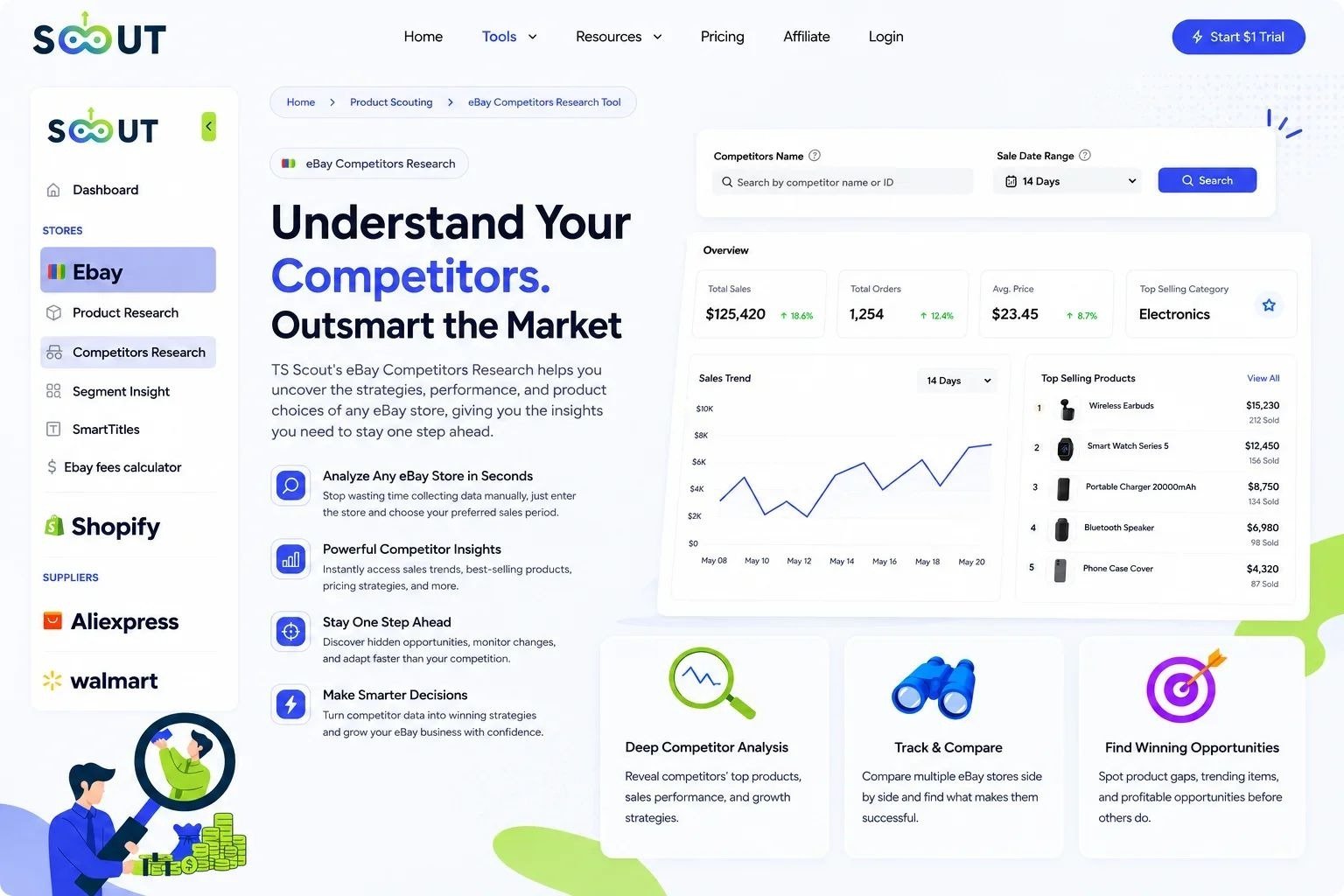
To streamline this process, use TS Scout’s eBay Competitor Research to review competitor stores on eBay, analyze their product strategies, and evaluate store performance. This tool provides clear insights into top-selling listings, pricing structures, and overall store trends, allowing you to adapt successful approaches to your own catalog.
For a broader look at building a long-term ecommerce venture, consult our guide on how to build ecommerce brand.
What Are the Exact Requirements for Top Rated Seller Status?
Achieving Top Rated Seller (TRS) status provides higher search visibility, official trust badges, and lower selling fees. Requirements for merchants operating in US and UK markets are managed strictly via the Seller Hub Performance section.
|
Metric |
Threshold Requirement |
Why It’s Vital for Non-Stock |
|
Defect Rate |
≤0.5% |
Prevents stock-out cancellations. |
|
Late Shipment Rate |
≤3.0% |
Validates supplier speed. |
|
Valid Tracking Upload |
≥95.0% |
Protects delivery promises. |
|
Closed Without Resolution |
≤0.3% |
Manages dispute safety. |
As outlined directly in the official eBay Performance Standards documentation, sellers must meet specific metric thresholds over an evaluation window:
-
Transaction Defect Rate: Must stay at or below 0.5% (includes stock cancellations and cases lost).
-
Late Shipment Rate: Must remain below 3.0%.
-
Valid Tracking Uploads: At least 95.0% of orders must have tracking uploaded and scanned within your stated handling time.
Maintaining these levels requires fast supplier processing. If a supplier experiences stock shortages, cancel orders promptly using proper procedures to avoid defects, as outlined in our guide on how to cancel an ebay order as a seller. Additionally, consider upgrading your store tier as sales grow by reviewing our breakdown of ebay store subscription plans.
How Can Advanced Analytics Drive Scalable Store Growth?
To continuously expand your store, establish a routine data auditing process using advanced research utilities.
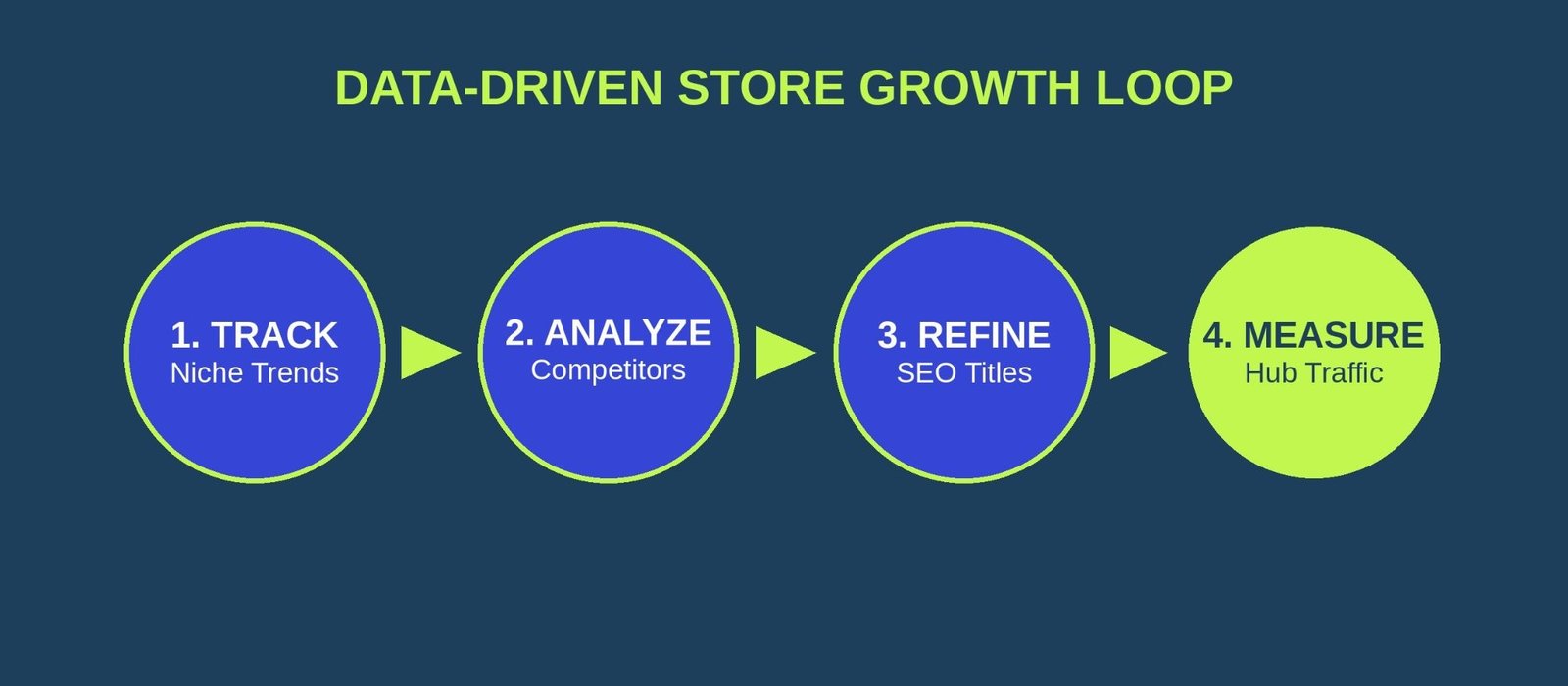
What Step-by-Step Framework Drives Sustainable Store Growth?
-
Catalog Expansion: Identify high-demand categories using TS Scout’s eBay Product Research, which allows you to search and analyze products on eBay using advanced filters such as price, marketplace, and seller feedback to assess key metrics like listing volume and average sold prices.
-
Listing Refinement: Audit low-converting listings in your Seller Hub. Update titles with high-intent search terms and specific identifiers, such as changing "Wireless Earbuds" to "Bluetooth 5.3 Wireless Earbuds with Charging Case, IPX7 Waterproof."
-
Seasonal Adjustments: Plan updates ahead of peak shopping periods by referencing our ebay seasonal selling calendar.
Are You Ready to Scale Your Business to the Next Level?
Scaling an online storefront requires clear market visibility, optimized listings, and competitive insights. Take full control of your eBay performance today by unlocking the complete suite of TS Scout analytics tools.
Start Your 14-Day Full Access Trial for Just $1 and access high-level product research, competitor tracking, and listing optimization features designed to grow your store.
Frequently Asked Questions (FAQ)
-
How do I access the eBay Seller Hub?
You can access the Hub by navigating directly to ebay.com/sh/ovw](https://ebay.com/sh/ovw in the US or ebay.co.uk/sel/hub in the UK. If your account displays the classic view, click "Start Using Seller Hub" on the landing page to activate it for free.
2.Can I manage my store using the Seller Hub without holding physical stock?
Yes. The Seller Hub provides tracking management, automated order handling, and performance analytics that allow you to coordinate supplier logistics efficiently.
-
What is the difference between eBay Terapeak and TS Scout?
Terapeak provides internal historical data from within eBay. TS Scout complements this by offering dedicated competitor analysis tools, exact search volume metrics, and automated niche discovery features to help you find opportunities faster.
-
How often does eBay evaluate seller levels for Top Rated Status?
-
eBay evaluates seller accounts on the 20th of every month based on performance metrics over the preceding 3 to 12 months.
-
Why is the Valid Tracking Upload Rate critical for non-stock sellers?
Because fulfillment relies on third-party suppliers, uploading valid tracking within your stated handling time ensures you meet the 95% threshold required to protect your seller status and avoid account penalties.
like?


Table of Contents
- How Can You Master the eBay Seller Hub Command Center?
- Which Native Tools Help Identify High-Demand Products?
- How Do You Optimize Listings to Drive Organic Rankings?
- How Can You Leverage Marketing Tools for Maximum ROI?
- How Do You Outmaneuver Competitors Without Owning Inventory?
- What Are the Exact Requirements for Top Rated Seller Status?
- How Can Advanced Analytics Drive Scalable Store Growth?
- Are You Ready to Scale Your Business to the Next Level?
- Frequently Asked Questions (FAQ)