
Shopify SEO for Beginners: Master It in One Sitting, No Tech Skills Needed
- 2026-09-29
-
 0
0

You finally launched your Shopify store, added your products, and hit publish, and now you're waiting for the sales to roll in. Days pass, and the only visitors are the ones you send yourself from Instagram. That silence usually means one thing: Google doesn't know your store exists yet, or it doesn't understand what you sell. This is where shopify seo for beginners work starts, and the good news is you don't need a developer or a marketing degree to get it right. Shopify itself points out that search remains one of the biggest drivers of how shoppers discover new online brands, even as AI-generated summaries reshape the results page.
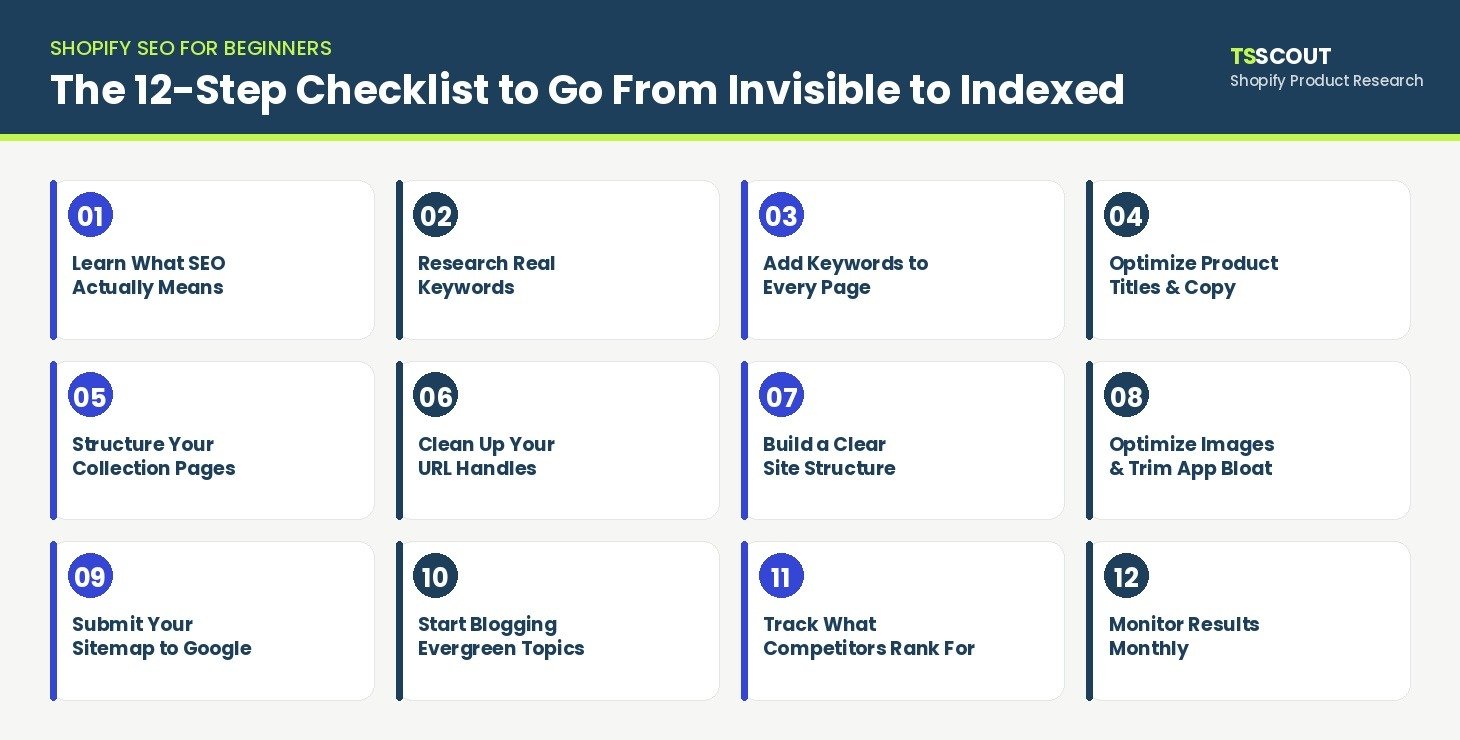
What most beginners get wrong isn't the theory, it's trying to tackle fifty scattered tasks at once instead of following one clear order. This checklist strips shopify seo 101 down to the steps that actually move a brand-new store from invisible to indexed, in the sequence Google expects to see them. Whether you move your catalog over after you migrate your eBay store to Shopify, or you're still weighing this platform against WooCommerce vs Shopify before committing, the fundamentals below apply the moment your store goes live. Work through each numbered section in order, apply it inside your own admin as you read, and by the end you'll have covered every box on a real Shopify SEO Checklist for Beginners, not just read about one.
What Does "Doing SEO" Actually Mean for a New Shopify Store?
Strip away the jargon and shopify seo basics comes down to three questions Google is trying to answer every time it crawls your store: can I access your pages, do I understand what's on them, and do I trust them enough to show them to a searcher. That's it. There's no secret algorithm hack, just making sure your titles, descriptions, structure, and content give Google (and the shopper) an obvious answer to "what is this page about, and why should I show it first?"
New store owners often assume SEO is something you do once the store is finished. In reality, the earlier you build these habits, the less rework you'll need later, especially if you're still deciding on your niche or reading up on seo for shopify as a discipline before you commit a content budget to it. Think of this checklist as the order you'd want to hand a new hire on day one, not a reference glossary.
Where Do You Actually Find the Right Keywords for Your Store?
Before touching a single setting in your admin, you need to know what your actual customers type into Google. Skip keyword tools with big scary numbers for a minute and start with what's free and already in front of you:
-
Google autocomplete, start typing your product name and note what Google suggests finishing the sentence with.
-
"People also ask" and "related searches" on the results page, these are real phrasings, not guesses.
-
Your own product reviews and customer messages, the words customers use to describe a problem are usually better keywords than the words you use to describe the solution.
The mistake most beginners make is chasing the keyword with the highest search volume instead of the one with the clearest intent. A search like "waterproof running shoes for winter" tells you exactly what the searcher wants and that they're close to buying; a bare word like "shoes" tells you nothing and puts you in a fight against every shoe retailer online. For a new store, five accurate, intent-matched keywords beat fifty vague ones.
How Do You Add SEO Keywords to Your Shopify Pages Without Guessing?
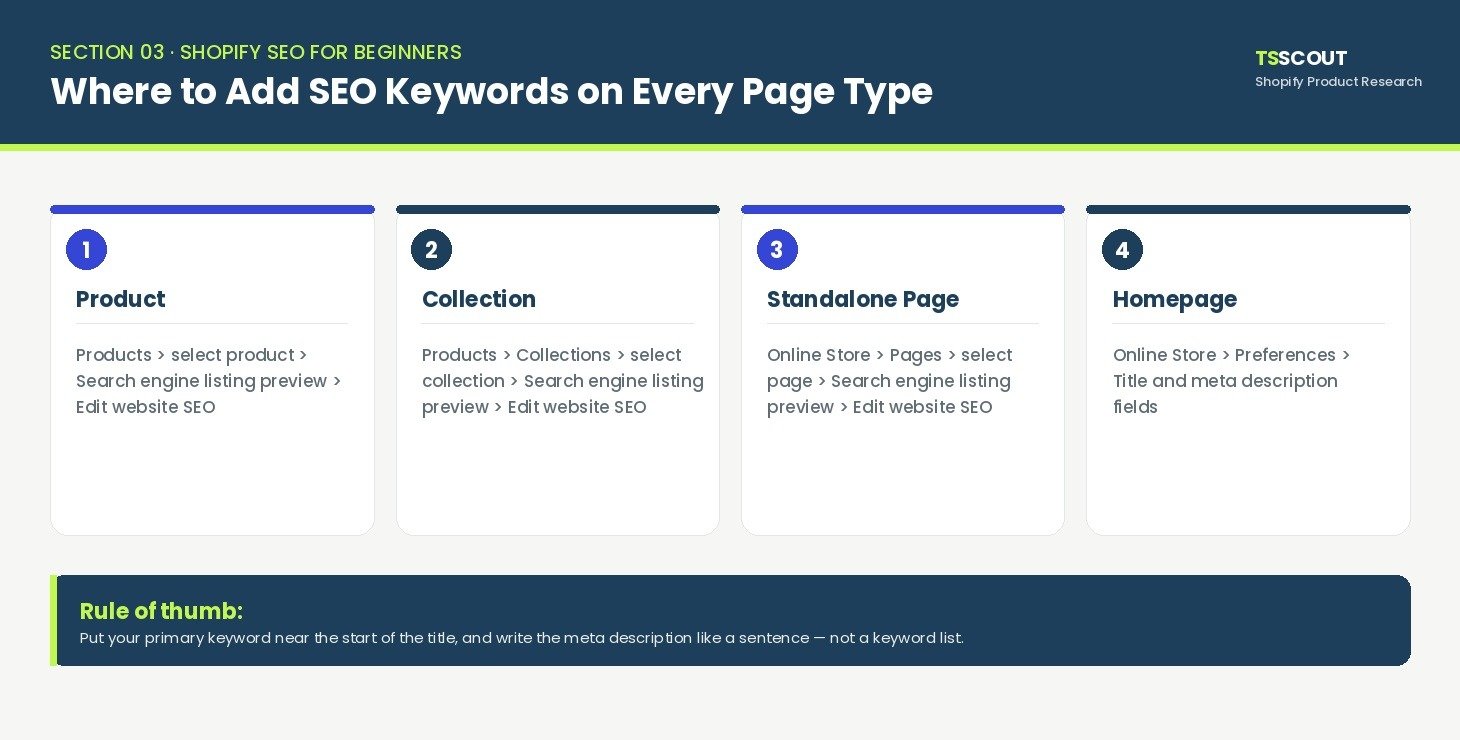
This is the step most beginners search for by name, how to add seo keywords to shopify, and it's simpler than it looks once you know where Shopify hides the field. According to the Shopify Help Center, every product, collection, and page has a "Search engine listing preview" section with an Edit website SEO button, where you set the page title and meta description that actually show up on Google, separately from your on-page headline.
|
Page type |
Where to find it |
|
Product |
Products → select product → scroll to Search engine listing preview → Edit website SEO |
|
Collection |
Products → Collections → select collection → same section |
|
Standalone page |
Online Store → Pages → select page → same section |
|
Homepage |
Online Store → Preferences → Title and meta description fields |
Two rules keep this from turning into keyword stuffing: put your primary keyword near the start of the title, and write the meta description as a natural sentence a human would click on, not a list of terms. A quick before/after makes the difference obvious:
-
Before: "Mug"
-
After: "Handmade Ceramic Coffee Mug | 12oz Glazed Stoneware"
The second version tells Google exactly what the product is and gives a real shopper a reason to click.
What Should Your Product Titles and Descriptions Include to Rank and Convert?
Your product page has to do two jobs at once: rank for the right search, and convince the person who lands on it to actually buy. If you're rewriting descriptions from scratch, lead with the specific benefit, mention the material or use case a search engine can match to a query, and never copy the manufacturer's boilerplate description word-for-word, since duplicate content across stores gives Google nothing new to rank. product seo shopify work is really this same discipline applied page by page, writing for the search and the shopper at once instead of picking one or the other.
If you want a deeper breakdown of tone and structure once the basics above feel automatic, Write Shopify Product Descriptions That Rank and Convert walks through that next layer.
Trust signals belong on this page too, not just the copy. Genuine customer reviews, clear sizing or usage details, and an honest, easy-to-find return policy all feed into what Google calls trustworthiness. Return policy gaps in particular cost more than most beginners assume, if you haven't audited yours yet, The Shopify Return Policy Gap is worth a look before you publish more product pages than you can fix later.
How Should You Structure Your Collection Pages So Google Understands Them?
Collection pages are where most beginners under-invest, treating them as a folder of products with no text of their own. Google can't tell the difference between an empty shelf and a curated one unless you tell it:
-
Add a short (2–4 sentence) description above or below the product grid explaining who the collection is for.
-
Use one clear, singular focus per collection, "Men's Running Shoes" ranks better than a catch-all "Shoes" page competing with itself.
-
Avoid creating a new collection for every filter combination (color, size, price) unless it targets a real search, each one is a thin, near-duplicate page competing with your main collection.
Are Your URLs Helping or Hurting Your Rankings?
Shopify locks the base structure of your URLs, /products/, /collections/, and /pages/ can't be changed, but you have full control over the "handle" that comes after it, edited from the same Edit website SEO panel used for titles. A clean handle like /products/ceramic-coffee-mug tells Google (and the shopper glancing at the link) exactly what's on the page; a default handle full of random characters or a name change history does not.
One rule matters more than any other here: if you edit the handle of a product or page that's already live and indexed, tick Create a URL redirect. Skip it, and anyone who already bookmarked or ranked that old link lands on a 404, and you lose whatever ranking progress that page had made.
One Shopify-specific quirk worth knowing: every product actually has two working URLs, one under /products/your-product, and another under /collections/collection-name/products/your-product when a shopper reaches it through a collection page. That looks like duplicate content, but according to the Shopify Help Center, Shopify automatically adds a canonical tag pointing back to the clean /products/ version, so Google knows which one to index. You don't need to do anything to fix this yourself, just don't let an app or a custom theme edit strip that canonical tag out, since that's the one thing that can turn this non-issue into a real one.
Is Your Site Structure Making It Easy for Google (and Shoppers) to Navigate?
A Shopify eCommerce Store with flat, shallow navigation gets crawled faster and converts better than one where a product is five clicks deep. Keep your main menu to core categories, link related products to each other from within the product description (not just a generic "you may also like" widget), and make sure every page you care about is reachable within two or three clicks from the homepage.
One more thing worth checking before you move on: Google ranks your store based on how it looks and performs on mobile, not desktop, since Google crawls and indexes the mobile version of your pages first. Most current Shopify themes are mobile-responsive by default, but that's not the same as mobile-friendly. Open a few of your key pages on your own phone and check that text is readable without zooming, buttons are easy to tap without misclicking a neighboring one, and nothing runs off the edge of the screen horizontally. Google's free Mobile-Friendly Test tool will flag any of these issues in a few seconds if you'd rather not check page by page.
This is also where brand consistency starts paying off in search, a store that reads as one coherent brand rather than a random product dump tends to earn more return visits and more direct/branded search traffic over time, which is part of what it actually takes to Build eCommerce Brand equity rather than just list products.
Are Your Images and Apps Slowing You Down or Helping You Rank?
Images do double duty: they need alt text for accessibility and search, and they need to be light enough not to drag down your load time. On alt text, Shopify splits this into two separate places depending on the image type. For product photos, the Shopify Help Center confirms you add it directly from the product's media preview screen with an Add alt text button. For images built into your theme, banners, section backgrounds, logos, the process lives in the theme editor instead, not the product admin.
Write alt text as a plain description of what's actually in the image ("handmade ceramic coffee mug, blue glaze, side view"), never as a keyword list.
Speed is the other half of this section, and it's not just about image file size, though that's the easiest win: compress product photos to WebP before uploading, since it's a lighter format than JPEG or PNG at the same visual quality, and Shopify serves it automatically once it's uploaded. Beyond images, two other habits matter just as much for a new store. First, pick a lightweight, speed-built theme (Dawn and similar free Shopify themes are built for this) rather than a heavy, feature-stacked one, since a slow theme drags down every single page regardless of how optimized your images are. Second, turn on lazy loading for anything below the fold, most modern Shopify themes do this by default, but it's worth checking your theme settings if you're on an older one, so images further down a long product or collection page don't load until a shopper actually scrolls to them.
Every app you install adds its own script to every page load, whether or not the shopper ever uses it. Once a month, open Apps in your admin and ask honestly whether each one is still earning its place, app bloat is one of the most common, least obvious reasons a new Shopify store loads slowly.
Have You Told Google Your Store Exists Yet?
Shopify automatically generates an XML sitemap and a robots.txt file for every store, and it also adds basic structured data to your product pages behind the scenes, so you're not starting from zero, and you don't need to build any of that manually. What you do need to do is confirm Google knows where to look. Per the Shopify Help Center:
-
Deactivate private mode on your online store, Google can't verify or crawl a store that's still password-protected.
-
Verify your domain as a property in Google Search Console.
-
Submit your sitemap file, found at yourdomain.com/sitemap.xml, from the Sitemaps section of Search Console.
Skipping step one is the single most common reason beginners get stuck on a "couldn't fetch" error and assume something is broken with their store.
Is Blogging Actually Worth It for a New Shopify Store?
For a brand-new store with no backlinks and no domain history, yes, a blog is often the fastest way to rank for anything, because product pages alone rarely compete for informational searches. The key is picking topics with staying power rather than chasing trends that expire in a month.
If you're not sure what that looks like in practice, What Is an Evergreen Product? walks through picking angles that keep pulling in search traffic long after publishing, rather than a post that's only relevant for a season.
Once that concept clicks, the next question is usually which niches to actually write about, that's where Evergreen Product Categories comes in handy as a starting list rather than staring at a blank page.
Content ideas don't have to stay abstract, either. A guide comparing Top UK Suppliers for Shopify Stores targets a real, specific search a generic "how to start a store" post never will, and if a chunk of your audience sells into that market, a piece on Shopify eCommerce in the UK rounds out the same content cluster with searches a first-time blogger would otherwise miss entirely.
What Are Your Competitors Already Ranking For, and How Do You Catch Up?
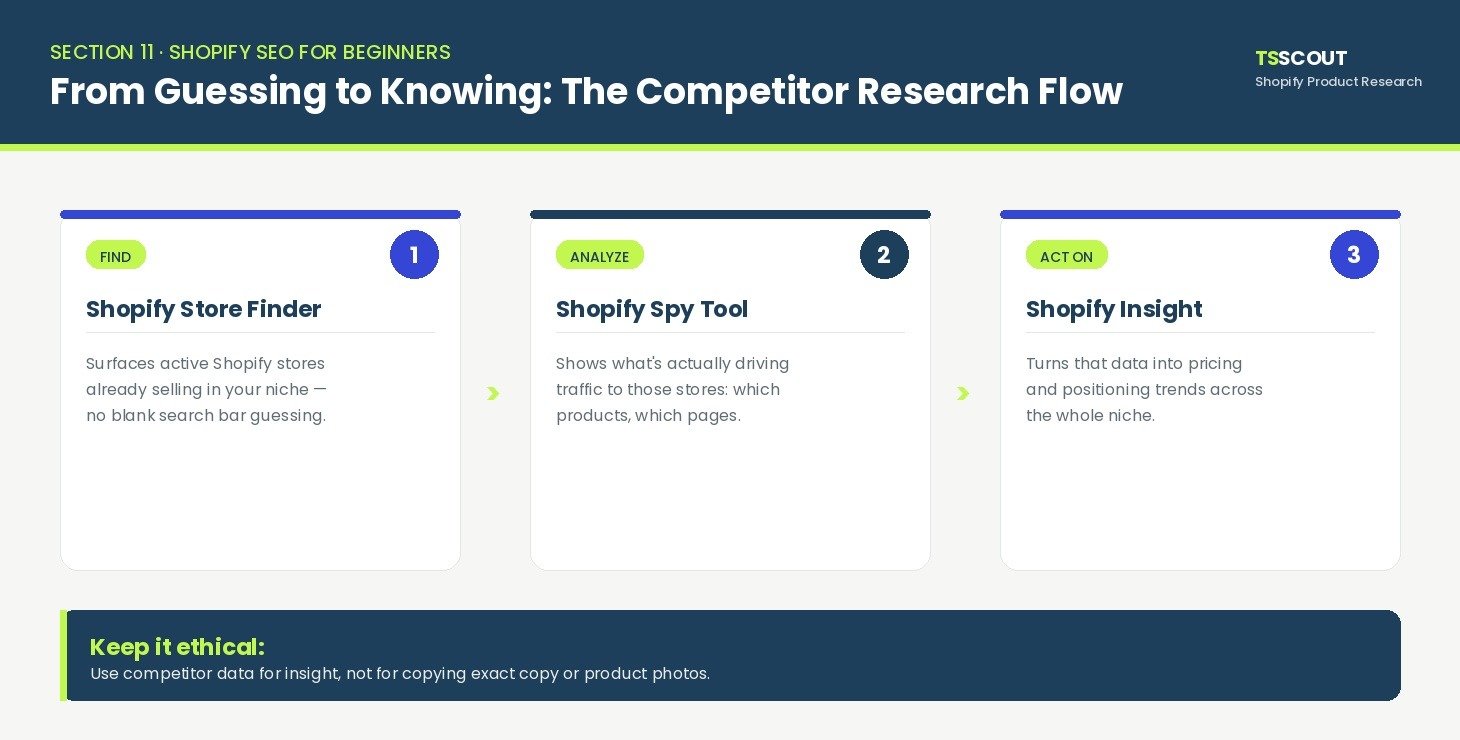
Guessing what's working for other stores in your niche wastes time you don't have as a beginner. This is the one part of the checklist where doing it manually is genuinely slower than using the right tool for the job. Shopify Find Stores shortcuts the discovery step by surfacing active Shopify stores already selling in your niche, so you're not starting your competitor list from a blank search bar. From there, Shopify Competitor Research tool shows what's actually driving traffic to those stores, which products, which pages, instead of you trying to reverse-engineer it by browsing their site manually.
Once you know who to watch, Shopify Insight turns that into usable data on pricing and positioning trends across the niche, which is far more reliable than eyeballing a handful of competitor pages and guessing. This kind of research only counts as useful if it stays fair; borrowing a competitor's exact copy or product photos isn't research, it's a shortcut to a takedown notice, which is why it's worth reading Ethical Shopify Competitor Research before you get too deep into any one competitor's store.
A quick illustrative example: a beginner selling ceramic mugs might assume their main competition is the big homeware chains. Running their niche through Shopify Competitors Research Tool instead often surfaces two or three small independent stores actually outranking them for long-tail searches like "handmade stoneware mug gift", a much more winnable target than competing head-on with a national retailer.
How Do You Know If Any of This Is Actually Working?
SEO doesn't show results overnight, so you need one place to check progress instead of guessing from vibes. Google Search Console's Performance report shows exactly which queries bring people to your store, which pages get impressions but no clicks (a sign your title or description needs work), and which pages have dropped out of the index entirely.
Set a recurring monthly check-in rather than watching daily, rankings move slowly, and small day-to-day swings are usually noise, not signal. If you want SEO progress to mean something beyond traffic numbers, tie it back to what actually pays the bills; The Profit Anatomy is a useful next read for connecting organic traffic growth to real margin, not just visitor counts.
Ready to Turn This Checklist Into Actual Shopify Traffic?
Every section above is something you can open in your own admin today, no developer, no agency retainer, no waiting on a freelancer's schedule. The stores that actually rank aren't the ones with the fanciest tech; they're the ones that worked through the fundamentals in order and kept at it monthly instead of once.
The part most beginners skip isn't in your admin at all, it's knowing who you're actually competing against. Try TS Scout for $1 and get full access for 14 days to see exactly which Shopify stores in your niche are already winning, and what they're doing that you're not yet.
FAQs
-
Do I need to hire an SEO agency to do any of this?
No. Every step in this checklist is done directly inside your Shopify admin, using free tools Google already provides. An agency becomes useful later, once you're managing hundreds of product pages and need this done at scale.
-
How long does Shopify SEO take to show results?
Most new stores start seeing early movement in Search Console within a few weeks of completing the technical steps, but meaningful ranking growth for competitive keywords typically takes a few months of consistent content and link-building on top of the checklist.
-
Do I need an SEO app for Shopify?
Not to complete this checklist, every field mentioned here (titles, meta descriptions, alt text, URL handles) is a native Shopify feature. Apps can help later with bulk editing large catalogs, but they're not required to get the basics right.
-
Is this a one-time checklist, or do I need to repeat it?
Treat sections 1–9 as a one-time setup per page, but revisit sections 8, 9, 11, and 12 monthly speed, indexing, competitor movement, and rankings all shift over time even if your store doesn't change.
-
Does Shopify handle any of this automatically?
Yes, sitemaps, robots.txt, basic product structured data, HTTPS, and mobile-responsive themes are all handled by the platform by default. What Shopify doesn't do for you is write your titles, descriptions, and alt text, or decide your site structure.
-
Will changing my URL handles hurt my SEO?
Only if you skip the redirect. Always tick "Create a URL redirect" when editing the handle of a page that's already live, and you'll keep whatever ranking progress that page has made.
-
Is Shopify actually good for SEO compared to other platforms?
Shopify's built-in technical foundation (HTTPS, sitemaps, mobile themes) is strong out of the box, but like any platform, the ranking still depends on what you build on top of it, the steps in this checklist, not the platform choice itself, are what move the needle.
like?


Table of Contents
- What Does "Doing SEO" Actually Mean for a New Shopify Store?
- Where Do You Actually Find the Right Keywords for Your Store?
- How Do You Add SEO Keywords to Your Shopify Pages Without Guessing?
- What Should Your Product Titles and Descriptions Include to Rank and Convert?
- How Should You Structure Your Collection Pages So Google Understands Them?
- Are Your URLs Helping or Hurting Your Rankings?
- Is Your Site Structure Making It Easy for Google (and Shoppers) to Navigate?
- Are Your Images and Apps Slowing You Down or Helping You Rank?
- Have You Told Google Your Store Exists Yet?
- Is Blogging Actually Worth It for a New Shopify Store?
- What Are Your Competitors Already Ranking For, and How Do You Catch Up?
- How Do You Know If Any of This Is Actually Working?
- Ready to Turn This Checklist Into Actual Shopify Traffic?
- FAQs