

Profit Pivot: How to Use Competitor Price Tracking to Protect Margins Without Joining the Race to the Bottom
- 2026-06-07
-
 0
0

A competitor drops their price, and your stomach tightens. For a seller who doesn't hold stock, that number on the screen can feel like a direct hit to your entire margin. But a live listing price isn't a transaction, it's a hope. This is where the science of product research redraws the battlefield: instead of reacting to stickers, you track what buyers actually pay. On eBay, the gap between active asking prices and actual sold prices often runs 3% to 12%. That gap once held anxiety; now it holds your profit. By applying a research-driven lens, you turn competitor price tracking into the foundation of an eCommerce pricing strategy built for profit margin optimization not a race to the bottom.
The "Track Everything" Trap
Most sellers drown in spreadsheets, tracking every competitor's sticker price without context, no sold velocity, no shipping normalization, no indication whether a low price is strategy or dead-stock clearance. For sellers who don’t hold inventory, supplier costs shift quickly. If your tracking only captures asking prices, you’re piloting blind. Data hoarding erodes sharp decisions. A sound eCommerce pricing strategy demands better.
What True Competitor Price Monitoring Actually Delivers?
When you filter out noise and focus on verified sold data, monitoring becomes a decision asset:
-
Early trend detection: Spot market shifts like multiple sellers raising free-shipping thresholds before they impact your own costs or conversion rates.
-
Real competitive insight: Move beyond "who's cheapest right now" and understand who’s pricing actually converts at sustainable volume.
-
Optimized pricing strategy: Feed live market intelligence directly into an eCommerce pricing strategy that protects margin, not just turnover.
-
Reduced risk of price wars: Recognize which low prices are backed by deep inventory and which are temporary liquidation blips you can safely ignore.
-
Informed decision-making: Replace emotional reactions with evidence-based choices, making profit margin optimization a daily habit rather than a quarterly scramble.
-
Stronger brand positioning: Anchor your offers to value and reliability, not the lowest number on a page, so customers return for trust, not just discount.
Genuine competitor price tracking isn’t about knowing more it’s about knowing what matters.
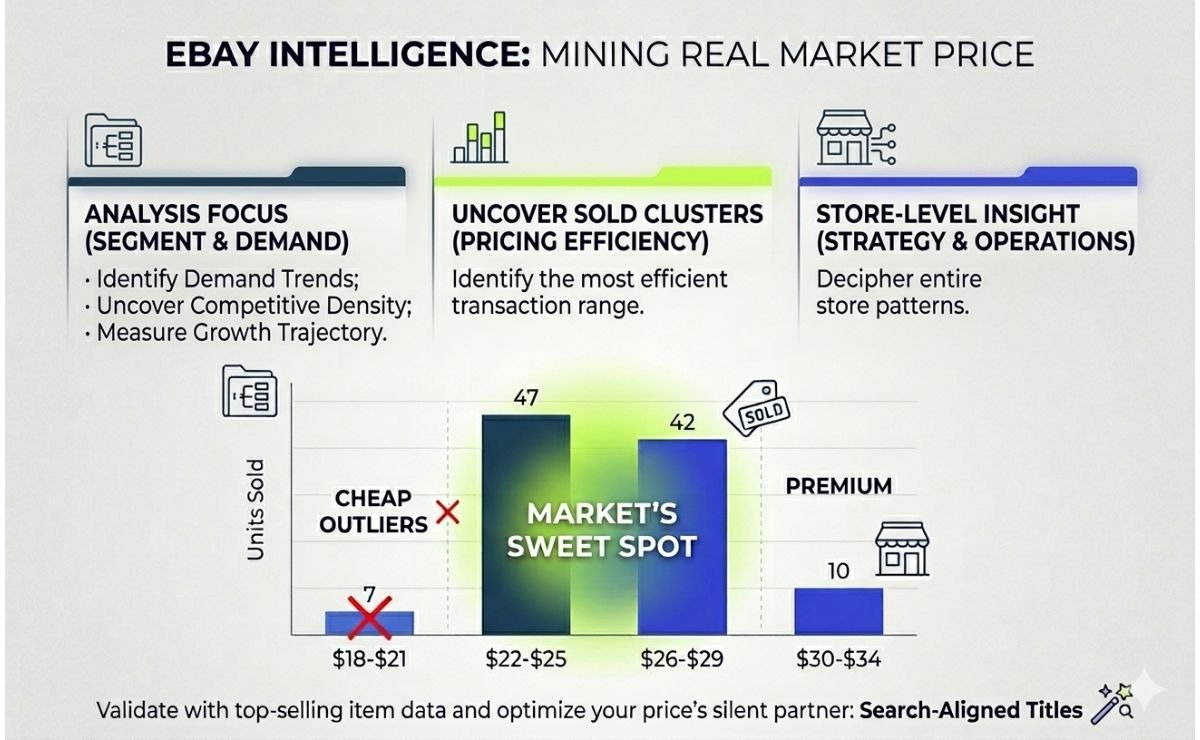
eBay Intelligence, Mining the Real Market Price
eBay openly shows what buyers actually paid. Use that transparency as your pricing advisor.
Start with the segment, not the SKU. Before tracking a single price, scan the niche: Is demand steady? Has competition thickened to where the spread between supplier cost and sold price nearly collapsed? If the price band is tight and compressed across all sellers, you’re in a commodity trap. A healthy spread between floor and ceiling means pricing can work. Direct your energy toward categories with genuine profit margin optimization potential.
Uncover the Real Market Price
Narrow your view to exact product condition and format. Filter out auctions and mismatched seller sizes. Pull 90-day sold data: listing volume, average sold price, units moved. Look for the dense cluster where sales happen quickly and consistently, not the cheapest outlier.
Example:
|
Price Band (per unit) |
Units Sold |
Average Days on Market |
|---|---|---|
|
$18 – $21 |
8 |
32 |
|
$22 – $25 |
47 |
6 |
|
$26 – $29 |
42 |
7 |
|
$30 – $34 |
9 |
19 |
The cheap outliers moved slowly, likely due to poor listing quality or a seller clearing one-off stock. The premium band moved slowly too, hitting resistance above $30. But the $22–$29 range cleared quickly and consistently that’s the market’s sweet spot. This is the insight that meaningful competitor price tracking delivers, and it’s far more actionable than a single average number. A dedicated eBay product research tool that surfaces sold metrics, listing volumes, and average prices makes uncovering this pattern a matter of minutes, not hours of manual tallying.
Once you know where the market actually transacts, the next step is to look at the sellers occupying that band and understand how their entire store strategy supports their pricing, not just a single SKU (Stock Keeping Unit).
Study the Store, Not Just the SKU
One cheap listing can cause panic. A whole store operating that way tells a different story. Once you've found the price band where volume moves, zoom out and examine the sellers inside it. A single low SKU is often not a threat, it's a deliberate doorway into a more profitable ecosystem.
Store-level analysis answers the questions that isolated price points never do:
-
Top sellers: Which products actually drive their revenue? Often, a few higher-priced items do the heavy lifting while the cheap ones just pull traffic.
-
Pricing pattern: Do they hold firm on most products and discount only a few, or slash everything weekly? Rhythmic discounting signals pressure you can sidestep rather than mirror.
-
Inventory depth: A rival with thousands of units likely has supplier terms you can't match. Matching their price isn't strategy; it's a quiet path to loss.
-
Bundle logic: Are low prices tied to basic variants while bundled offers carry the real margin? If so, differentiate your bundle rather than chase their entry price.
For a seller who doesn't hold stock, this view is essential. An eBay competitor analysis tool reveals store-level patterns that turn guesswork into strategy which listings actually sell, how deep inventory runs, and whether pricing is steady or erratic. You stop reacting to single stickers and start making decisions built on how an entire store operates. Your eCommerce pricing strategy stays grounded in reality, not isolated blips.
Validate the Signal Before You Commit
Cross-reference your product against top-seller lists in the category. Consistent high-demand appearance across timeframes confirms persistent buyer interest. Prioritize SKUs that sit squarely in a proven high-demand band.
The price tag’s silent partner. A listing title aligned with actual search terms lifts click-through rates and makes price less of a friction point. Before locking in a position, check your title against real search volume using a free eBay title builder. A crisp, search-aligned title gives your margin room to breathe.
Shopify Reconnaissance, Reading the Invisible Store
eBay hands you sold data. Shopify does not. On the surface, independent storefronts look like sealed boxes: you see the asking price, but you don't see what buyers actually paid, how many units moved, or whether that "compare at" price ever meant anything. For sellers used to eBay's transparency, this can feel like stepping onto a playing field with half the markings erased. But a store that doesn't volunteer its numbers still leaks signals through pricing structures, shipping thresholds, bundle logic, and product-page rhythms. Reading those signals correctly turns a closed store into an open book.
Find the Players Before You Track Their Moves
Before you ever study a competitor's pricing, you need to know who actually operates in your space. On eBay, competitors’ surface through search results. On Shopify, stores are scattered across independent domains, and the landscape is far less visible. Blind searching wastes hours and misses the quiet performers who don't advertise heavily but still move serious volume.
A more efficient path is to start with the product or niche, not a store name. By searching through a Shopify store finder tool that maps sellers by product category, niche keywords, or even a specific item, you build a competitor list grounded in real market activity rather than guesswork. In moments, you'll see which stores are actively selling in your space, what their catalog breadth looks like, and whether the market is fragmented or dominated by a few heavy players.
This step validates the niche before you invest deeper research effort. If the tool surfaces only a handful of active stores with thin product ranges, the opportunity may be quiet for a reason. If it returns a dense map of sellers with varied pricing and positioning, you've found terrain worth the reconnaissance work ahead. The list you build here becomes the foundation for every Shopify pricing insight that follows.
Dig Into Product-Level Performance
Once you know which stores matter, the next layer is to examine individual product performance not what a store hopes to sell, but what actually moves. A capable Shopify product research scan, filtered by price range, shipping location, time period, and category, surfaces the numbers that matter most:
-
Units sold: Confirms whether a price point has real velocity or just a slow trickle.
-
Average price: Shows where the market truly clears, not just what's listed.
-
Number of sellers: Warns if the niche is quietly overcrowding.
-
Active listings count: Indicates how aggressively competitors are stocking the product.
These metrics either confirm the sweet spot you identified on eBay or reveal a different band altogether, one shaped by Shopify's distinct buyer expectations around shipping, branding, and checkout flow. The whole scan takes only a few moments, leaving you with a snapshot that feeds directly into the pricing decisions ahead.
Zoom In on a Single Store
Some competitors deserve a closer look. Once the broader product scan flags a store that consistently holds the price band you're targeting, the next step is to examine how that entire operation runs. Entering a store's URL into a dedicated Shopify spy tool reveals the layered details that a product-level scan doesn't surface.
What opens up is a strategic profile, not just a price list:
-
Product catalog and pricing spread: See whether the store anchors low on a few entry items while premium variants carry the margin.
-
Sales performance signals: Understand which products drive their volume and whether their best-sellers sit above or below your target band.
-
Inventory patterns: Spot whether they're deep in stock on a few staples or spread thin across hundreds of experiments.
At this depth, one question gets answered clearly: should you even compete on price here? Deep inventory on a narrow catalog signals supplier leverage you can't match. Erratic pricing with shallow stock suggests testing, not dominating. Neither warrants a price war. You now see who holds the ground and who's just passing through.
The Cart-Level Reality Check
Tools miss checkout-page tricks. Walk through a competitor's cart to see the real transaction price. Check these:
-
Shipping threshold: Add one item, see shipping cost, then increase cart value until it drops to zero. That threshold is a pricing lever.
-
Exit discounts: Move to close the page. A pop-up discount reduces their effective price instantly.
-
Pre-loaded bundles: Accessories slipped into the cart at a bundled rate without notice.
-
Region-based shifts: Rates and promos that change by detected location.
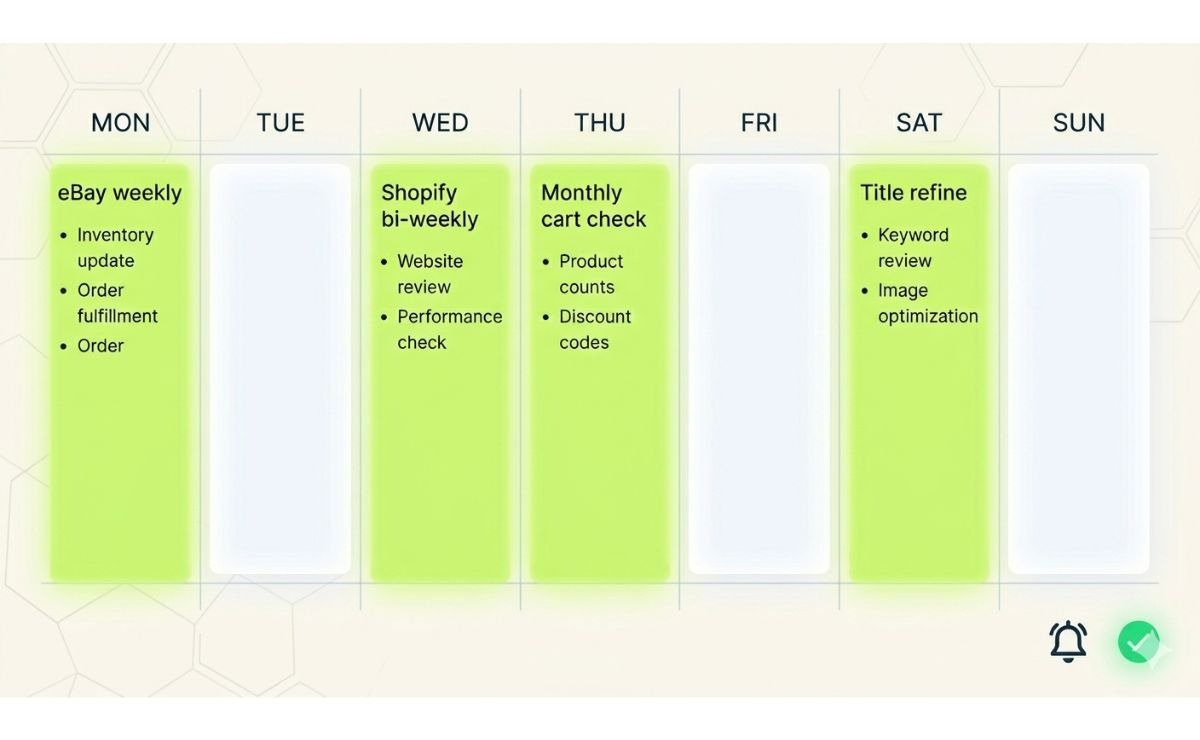
The total at checkout often differs from the sticker price. A cheap listing can inflate with hidden fees; a higher one may drop with automatic perks. Run this check monthly on your top two rivals, and your Shopify intel stays grounded in what buyers actually pay.
The Sweet Spot Equation
You now hold two sets of numbers. Before the market gets a vote, your own costs set the boundary. That boundary is your margin floor.
Draw Your Margin Floor:
Minimum Price = (Supplier Cost + Inbound Shipping + Platform Fee + Transaction Fee) + Minimum Net Profit
Quick definition of each:
-
Supplier cost: Item price delivered to your fulfillment point.
-
Inbound shipping: Include if charged separately; skip if built-in.
-
Platform fee: eBay final value fee or Shopify transaction percentage.
-
Transaction fee: Payment processor cut.
-
Minimum net profit: A figure you refuse to dip below your time and risk live here.
Write it down. It's non-negotiable. If a rival prices below your floor, you watch, not match. They're either burning margin you don't have or operating on terms you can't access. That clarity alone prevents the emotional cut that unravels a quarter's profit.
Build Your Market Corridor
Your floor is set. Now layer the market data over it. On one side, eBay's sold-price cluster shows where transactions actually happen. On the other, Shopify's effective prices reveal what buyers pay on independent storefronts. Plot both ranges together, and a corridor emerges the space between what the market tolerates and what your costs demand.
A simple way to visualize it:
|
Zone |
Position |
Action |
|---|---|---|
|
Below your floor |
Loss territory |
Don't enter, regardless of volume |
|
Floor to market low |
Thin margin band |
Enter only if velocity justifies it |
|
Market sweet spot |
The dense sold cluster |
Your target volume and margin coexist here |
|
Above the cluster |
Premium territory |
Requires trust signals to convert |
The sweet spot band is where most transactions close without destroying profit. If eBay's cluster sits at $24–$28 and your floor is $21, you have a $3–$7 decision range. That's breathing room. If the cluster sits at $19–$22 and your floor is $21, you're squeezed two choices: reduce supplier cost or reposition with a stronger offer.
The corridor turns data into a decision. You're no longer asking "What's the cheapest price?" You're asking "Where does my margin survive inside real demand?"
Pick Your Position Inside the Corridor
Your corridor is clear. Where you land inside it depends on what the buyer sees beyond the number:
-
Mid-band: Fair margin, natural demand. Most transactions happen here without friction.
-
Upper edge: Works only with a visible edge faster handling, sharper title, stronger feedback, or a bundle that shifts the value equation.
-
Low edge: Volume easier, but margin thin. Only viable if your supplier cost gives you room others lack.
Ask yourself: Does my offer outshine others in this band? If yes, hold firm. If not, a lower number won't save you. Pick where margin feels safe and your signals back it up then monitor, not obsess.
Building a Lean Monitoring System
Data is useless if it collects dust. The sellers who win on margin aren't the ones tracking the most they're the ones tracking the right few things, at the right rhythm, with a system that takes minutes, not hours. Here's how to build that without drowning.
1. Track the Vital Few
You don't need to monitor every product. Pick the 10 to 20 items that generate roughly 80% of your profit. These are your vital few. The rest can follow market trends passively. If a fringe product drifts, you adjust when you notice. If a core product shifts, you want to know within days. That filter alone cuts the tracking workload by an order of magnitude and sharpens every decision that follows.
2. Set the Right Rhythm Without Obsessing
Constant refreshing creates anxiety, not insight. A simple weekly cadence for eBay and a bi-weekly scan for Shopify keeps you informed without chaining you to the screen:
-
eBay (weekly): Quick check on sold-price movement for your vital few. Has the dense cluster shifted more than 5%? If not, move on.
-
Shopify (bi-weekly): Scan product performance and top competitor stores. Cart-level walkthrough on your top two rivals once a month.
Most price changes are temporary noise. A disciplined rhythm prevents you from reacting to blips and keeps your energy focused on structural shifts that actually warrant a response.
The System in Motion (with Signals That Matter)
A connected weekly rhythm, no fluff:
-
Confirm niche demand is stable.
-
Check eBay sold-price clusters for your vital few SKUs.
-
Scan Shopify product performance; zoom into one corridor competitor.
-
Monthly: cart walkthrough on a top rival.
-
Before pricing: refine your title against real search terms.
Quiet triggers that actually warrant attention:
-
Sold cluster drops 5%+ for two weeks → market repricing.
-
Shipping thresholds shift across 3+ rivals → logistics cost change, not a price war; adjust yours.
-
New deep-inventory seller enters your corridor → watch a month before reacting.
-
Floor breached → renegotiate supplier cost or reposition.
Everything else is weather. A simple flagged sheet keeps you sharp, not chained.
Measuring Impact and Adjusting Strategy
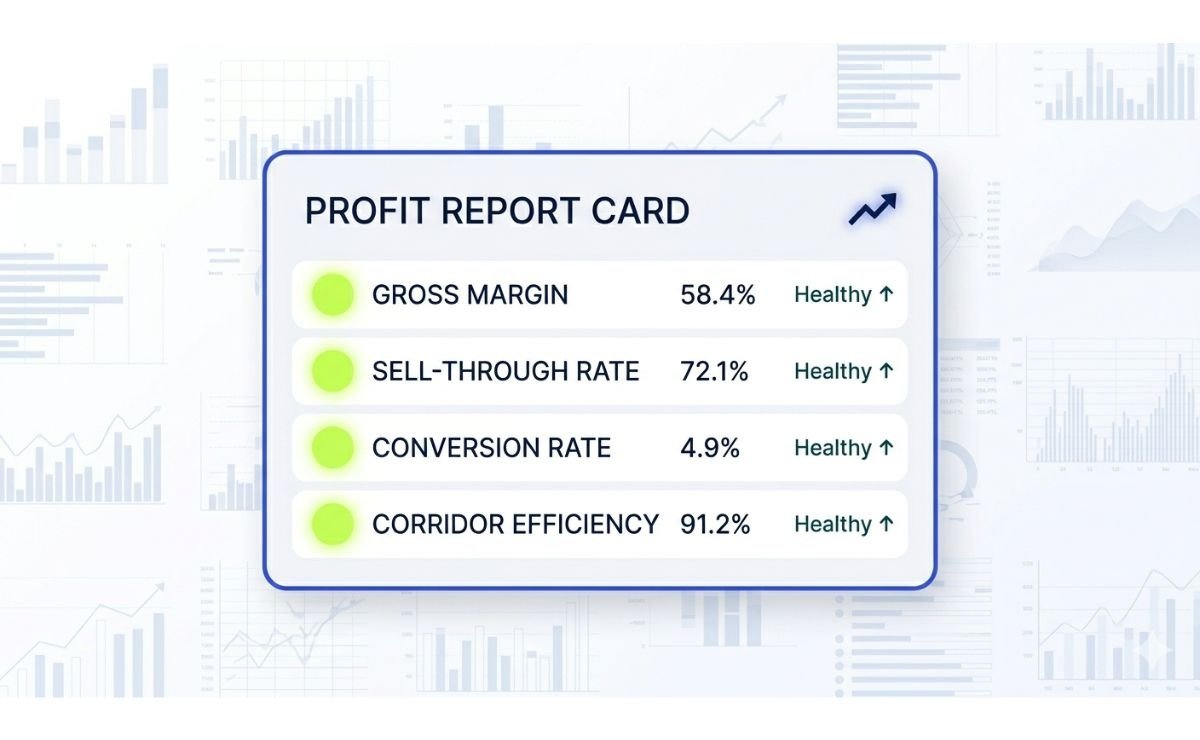
A system without measurement is motion without direction. Track a few signals that actually speak to profit, not vanity.
The Only Metrics That Matter
|
Metric |
What It Tells You |
|---|---|
|
Gross margin per sale |
Is profit holding or eroding? Track before and after each pricing move. |
|
Sell-through rate on vital SKUs |
Are items moving at your corridor position? Velocity matters. |
|
Conversion rate stability |
Does a price near the upper band still convert? If yes, your signals work. |
|
Corridor drift |
Is the sweet spot shifting over 90 days? Early catch prevents late panic. |
The 15-Minute Monthly Audit: Check actual net margin against your floor, confirm the sold cluster hasn't drifted more than 5%, and note any structural competitor change. Four lines per SKU. Patterns emerge by month three; by month six, you're anticipating shifts before they hit.
Ignore what doesn't signal: A competitor's price cut with flat sell-through is just margin burning. Temporary dead-stock clearance, a newcomer testing the water, or a liquidation event doesn't warrant your reaction. Real threats carry velocity, not just a lower sticker.
The quarterly zoom-out: Every three months, scan your segment from a distance. Has demand held? Has competition density spiked? Has the corridor narrowed to a sliver? If the breathing room is gone, two moves exist: lower your supplier cost or pivot toward a nearby niche where the spread still works. Early detection turns a slow bleed into a strategic shift.
Price Tracking as Your Profit Compass
The cheapest price wins once. After that, the seller with the healthier margin, sharper listing, and steadier nerve takes over. You don't hold stock, so your margin is the whole business. Tracking competitors was never about becoming them. It's about knowing exactly where your price can stand backed by evidence, protected by a floor, and placed inside a corridor where buyers say yes.
Start today with one SKU. Pull its solid cluster, draw your floor, and set your price inside the band. If you'd rather skip the spreadsheets and put every tool from this guide into motion immediately, there's a 14-day trial waiting for a single dollar. That's every eBay and Shopify research tool, every competitor analysis feature, and the full sweet-spot workflow unlocked for two weeks on your top product. One dollar. Fourteen days. Enough time to find your corridor, test your position, and prove to yourself that the profit pivot works.
That's the profit pivot. Not a race. A decision.

Frequently Asked Questions
1. What exactly is a "sweet spot" in an eCommerce pricing strategy?
The sweet spot is the price band where the highest concentration of actual sales occurs, not the lowest listing, but the range where volume and price remain steady over time. In the article's example, while some units sold at 18–21 and others above 30,the $22–$29 range cleared quickly and consistently. That is the sweet spot: the corridor where your eCommerce pricing strategy captures demand without sacrificing margin.
2. How often should I check competitor prices without becoming obsessive?
The article recommends a lean weekly rhythm. Check eBay sold-price clusters once a week for your top 10–20 SKUs; scan Shopify product performance every two weeks; and walk through a competitor's cart once a month. Most day-to-day price moves are noise. Only structural shifts like a 5%+ sold-price drop over two weeks warrant a response.
3. Does this eCommerce pricing strategy work for both eBay and Shopify sellers?
Yes, but the data sources differ. eBay openly shows sold prices, so you can build clusters from verified transactions. Shopify hides transaction data, so you rely on product research tools and signals like shipping thresholds, bundle logic, and inventory depth. The article explains how to run both types of reconnaissance and merge the insights into one market corridor.
4. How do I calculate my margin floor?
The floor formula is: (Supplier Cost + Inbound Shipping + Platform Fee + Transaction Fee) + Minimum Net Profit. Each component is defined in the article. This is your non-negotiable boundary. If a competitor prices below it, you watch, not match. Your eCommerce pricing strategy starts with knowing the price you cannot go under.
5. When should I react to a competitor's price drop and when should I ignore it?
Ignore a price drop if it has flat sell-through, shallow inventory, or no shipping-threshold change. These are often liquidations or tests. React when a deep-inventory seller enters your corridor and holds that price for a month, or when the sold cluster drifts down 5%+ across multiple sellers. The article's "quiet triggers" list gives a decision framework.
6. What if the market sweet spot drops below my margin floor?
You have two choices: lower your supplier cost or reposition with a stronger offer (bundle, faster handling, sharper listing). The article's final section "Measuring Impact & Adjusting Strategy" and the quarterly zoom-out explain how to detect this early and pivot before it bleeds your profit.
7. Can I apply this eCommerce pricing strategy without paid tools?
You can start manually by pulling sold data from eBay and walking through competitor carts on Shopify, but the process described especially the 90-day sold clusters, store-level analysis, and cross-channel scans is much faster with dedicated research tools. The article mentions a low-cost trial option that gives full access to eBay and Shopify research features for two weeks.
8. How do I know if a niche is still worth tracking?
Before tracking any SKU, run a quick segment health check: Is demand steady? Has competition thickened to a sliver? The article's "eBay Intelligence" section suggests a niche-level scan for demand patterns and competitive density. If the spread between supplier cost and typical sold price has nearly collapsed, the niche may be a commodity trap, and your eCommerce pricing strategy should direct your energy elsewhere.
like?


Table of Contents
- The "Track Everything" Trap
- What True Competitor Price Monitoring Actually Delivers?
- eBay Intelligence, Mining the Real Market Price
- Uncover the Real Market Price
- Study the Store, Not Just the SKU
- Validate the Signal Before You Commit
- Shopify Reconnaissance, Reading the Invisible Store
- Find the Players Before You Track Their Moves
- Dig Into Product-Level Performance
- Zoom In on a Single Store
- The Cart-Level Reality Check
- The Sweet Spot Equation
- Build Your Market Corridor
- Pick Your Position Inside the Corridor
- Building a Lean Monitoring System
- The System in Motion (with Signals That Matter)
- Measuring Impact and Adjusting Strategy
- Price Tracking as Your Profit Compass
- Frequently Asked Questions


